---
updatedAt: 2026-10-29T12:11:10.000Z
agentTools:
projectIndex: https://docs.pci-proxy.com/llms.txt
---
# Hosted tokenisation button
Use the hosted tokenisation button integration to seamlessly embed Google or Apple Pay buttons into your checkout page through our Secure Fields. With this integration we manage the onboarding process with the wallet provider and offer you a straightforward and hassle-free method to gather card details stored within cardholders' wallets.
## Process overview
Find below a high-level overview of the process flow:
## Activation
**Apple Pay**
To complete the onboarding at Apple please login to the Dashboard and navigate to the `Developers` menu within the project section. Open the `Apple Pay Settings` tab and enable Apple Pay if not already done.
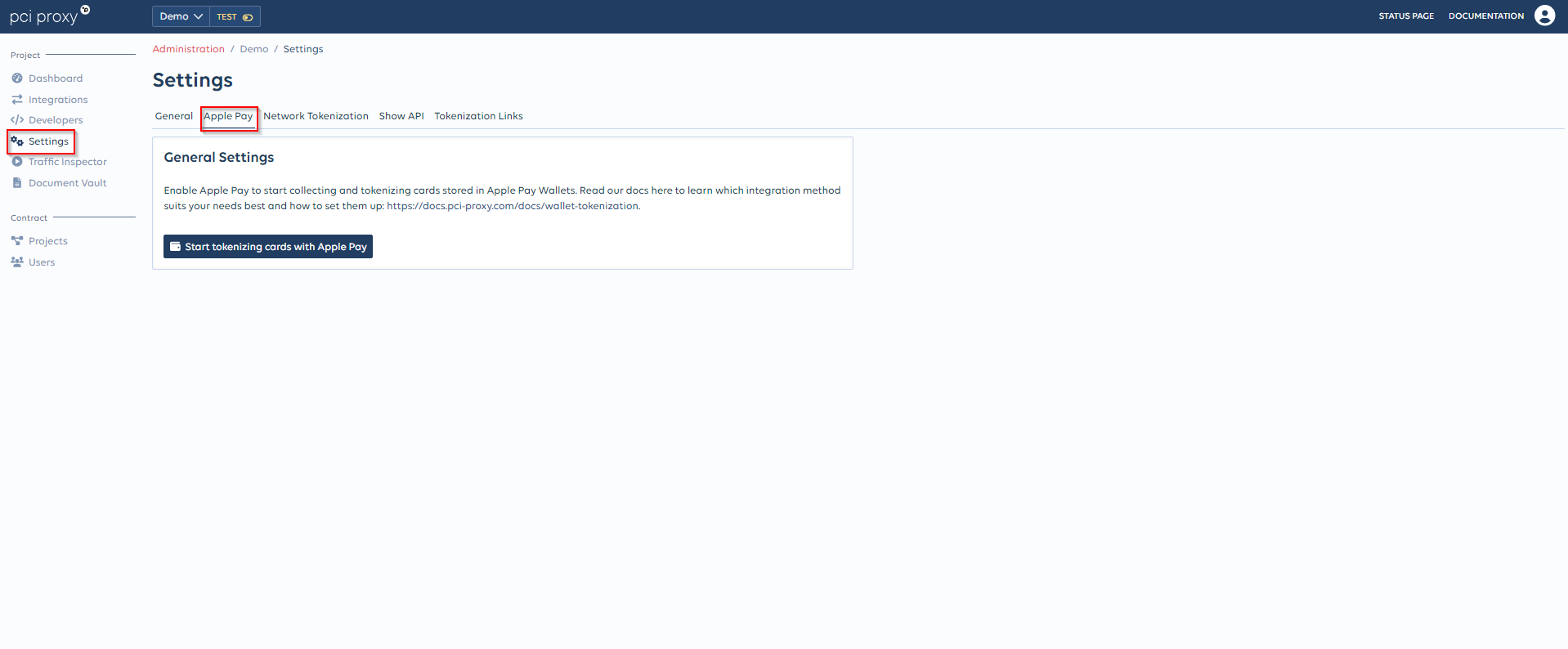
In the next screen configure the name you want to display on the Apple Pay payment sheet showed to the cardholder and press the `Enable` button. Finally add your domains and subdomains where the Apple Pay button will be hosted by adding the URLs in the `Associated Domains` section as shown below:
**Google Pay**
No setup required for Google Pay as PCI Proxy is taking care of it behind the scenes.
## Setup Tokenisation button
Follow the recipe below to get started:
**Setting up payment methods**
By default, all credit card types available in your merchant setup will be accepted. You can use the paymentMethods object to specify a subset of card types if you need to. The selection will apply to Google and Apple Pay if initisalised at the same time. For example,
```json Specify payment methods
secureFields.init(transactionId,
{
googlePay: "googlepay-container",
applePay: "applepay-container"
},
{
paymentMethods: ["ECA", "VIS"]
}
);
```
**Button style**
Configure the appearance of the Google Pay and Apple Pay buttons using the `type` and `color` properties. See the respective wallet provider documentation for supported values:
Google Pay: [Google Pay button options](https://developers.google.com/pay/api/web/reference/request-objects#ButtonOptions)
Apple Pay: [Apple Pay button styles](https://developer.apple.com/documentation/applepayontheweb/displaying-apple-pay-buttons-using-css)
```json Define button style and colour
secureFields.init(transactionId,
googlePay: {
placeholderElementId: 'googlePayPlaceholder',
button: {type: 'book', color: 'black'}
},
applePay: {
placeholderElementId: 'applePayPlaceholder',
button: {type: 'set-up', color: 'white'}
}
});
```
## Initialise tokenisation
To capture card data with the Tokenisation button, you need to initialize a transactionId via a server-to-server call first. Call our secureFields/tokenize endpoint with your desired parameters and we will return a transaction identifier ready to be used with our Secure Fields.
For the full API specification please see the [API reference](https://docs.pci-proxy.com/reference/inittokenize)
```curl Request
curl -L -X POST 'https://api.sandbox.datatrans.com/v1/transactions/secureFields/tokenize' \
-H 'Authorization: Basic {{basicAuth}}' \
-H 'Content-Type: application/json' \
--data-raw '{
"applePay": {
"merchantName": "Merchant Name",
"currency": "CHF",
"amount": 100,
"country": "CH"
},
"googlePay": {
"currency": "CHF",
"amount": 100,
"country": "CH",
"allowedAuthMethods": [
"CRYPTOGRAM_3DS"
]
}
}'
```
```javascript Response
{
"transactionId": "230919162326558204"
}
```
> 📘 Strong Customer Authentication (SCA) data
>
> Merchants which are subject to **Strong Customer Authentication** must make sure to submit `country` and `amount`. Not providing the correct amount or country might impact the liability shift.
>
> Make sure that `amount` matches with the amount which will be authorized and charged to the cardholder in any downstream payment. It is also the value which will be displayed in the payment sheet presented to the cardholder.
## Request PCI Proxy token
Once you have transmitted the `transactionId` from the client to your server, you then need to execute a server-to-server POST request to retrieve the PCI Proxy token and 3D data provided by the wallets if available.
Check the `walletIndicator` parameter to see the original wallet provider of the returned token. For Google Pay, it returns `PAY` and for Apple Pay `APL`.
> ❗️ Strong Customer Authentication and liability shift
>
> **Google Pay**
>
> The Google Pay API might return cards on file on Google.com (`PAN_ONLY`) or a device token on an Android-powered device authenticated with a 3D-Secure cryptogram (`CRYPTOGRAM_3DS`). The type of authentication method you want to accept, is defined in the `allowedAuthMethods` within the googlePay object in the initialisation request.
>
> In case of a `CRYPTOGRAM_3DS` enabled card, 3D-Secure related data such as the `eci` and `caav` values will be present in the `3D` object of the get TOKEN API response. For cards with `PAN_ONLY` authentication, no `3D` object is returned and a separate 3D-Secure authentication step might be required. Refer to [3D Secure Authentication](https://docs.pci-proxy.com/docs/3d-secure-api) if you want to process 3D-Secure authentications with PCI Proxy.
>
> **Apple Pay**
>
> Visa Apple Pay tokens come with 3D-Secure data elements (`eci` and `caav`) in the `3D` object of the get TOKEN API response as Apple Pay is only returning device PANs (DPAN). For Mastercard tokens the `eci` value is not available.
### Example Request & Response
```curl Request
curl -L -X POST 'https://api.sandbox.datatrans.com/v1/tokenizations/{{transactionId}}' \
-H 'Authorization: Basic {{basicAuth}}' \
-H 'Content-Type: application/json'
```
```curl Response Apple Pay
{
"alias": "7LHXscqwAAEAAAGLbFhOeHrXIiMLAEcX",
"fingerprint": "F-dN4ZBIp_rGghxyGVlDmVOv",
"maskedCard": "412374xxxxxx0013",
"expiryYear": "25",
"expiryMonth": "06",
"cardInfo": {
"brand": "VISA",
"type": "credit",
"usage": "consumer",
"country": "US",
"issuer": ""
},
"walletIndicator": "APL",
"3D": {
"cavv": "Yzu7ORQAA1LQNMiNlUP6MAACAAA=",
"eci": "5"
},
"last4": "1914"
}
```
```javascript Response Google PAY (w/ 3D)
{
"alias": "7LHXscqwAAEAAAGLbRHwv1vpwvThAOyd",
"fingerprint": "F-dN4ZBIp_rGghxyGVlDmVOv",
"maskedCard": "412374xxxxxx0013",
"expiryYear": "25",
"expiryMonth": "06",
"cardInfo": {
"brand": "VISA",
"type": "credit",
"usage": "consumer",
"country": "US",
"issuer": ""
},
"walletIndicator": "PAY",
"3D": {
"cavv": "AgAAAAAABk4DWZ4C28yUQAAAAAA=",
"eci": "07"
},
"last4": "1914"
}
```
```javascript Response Google Pay (PAN_ONLY)
{
"alias": "7LHXscqwAAEAAAGK4UF0bShLshqhAGri",
"fingerprint": "F-fkO8WHlN03g-bhs44wFI9J",
"maskedCard": "412374xxxxxx0013",
"expiryYear": "25",
"expiryMonth": "06",
"cardInfo": {
"brand": "VISA",
"type": "credit",
"usage": "consumer",
"country": "US",
"issuer": ""
},
"walletIndicator": "PAY",
"last4": "0013"
}
```
> 📘
>
> Check `last4` to see the original last four digits of the full pan (FPAN). Values returned in the `maskedCard` element represent the masked device pan (DPAN) - except for the Google Pay `PAN_ONLY`flow where the FPAN is returned as masked value.
## Showcase & Examples
The source code for the integrations is hosted on our GitHub [Repository](https://github.com/datatrans/secure-fields-sample). To see an an interactive demo please visit here: [Online demo](https://datatrans.github.io/secure-fields-sample/pciproxy-examples/wallets.html)